java cookie自动登录功能的实现 小例子 实用小功能
此实例模拟针对cookie自动登录 (局限于一个域名下)
实例分为如下几步
1) 创建项目及操作类 效果如图
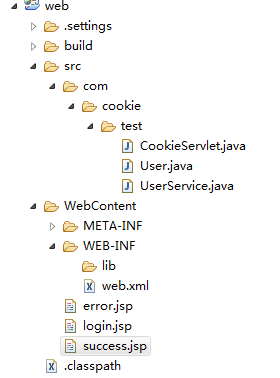
user类属性:
private int id;
private String username;
private String password;
UserService 只是模拟查询操作:
     public class UserService {
	static Map<String, User> users = new HashMap<String, User>();
	static {
		users.put("wj", new User(1, "wj", "1"));
		users.put("zs", new User(2, "zs", "1"));
		users.put("lisi", new User(3, "lisi", "1"));
		users.put("zw", new User(4, "zw", "1"));
		users.put("zhou", new User(5, "zhou", "1"));
	}

	public User getLoginUserByName(String name) {
		return users.get(name);
	}
}
2)添加页面代码 添加表单
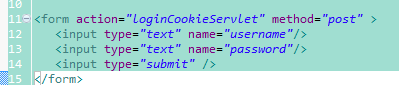
3) 添加表单提交的处理器 servlet 【loginCookieServlet】
protected void doGet(HttpServletRequest request, HttpServletResponse response) throws ServletException, IOException {
this.doPost(request, response);
}
protected void doPost(HttpServletRequest request, HttpServletResponse response) throws ServletException, IOException {
String username = request.getParameter("username");
String password = request.getParameter("password");
//若客户端提交表单的时候 检验表单数据,且尚未登录 是否存在,不存在的话 在cookie里取值 并处理登录流程
if(username == null && request.getAttribute("currentUser") == null){
//得到客户端的COOKIE列表 ,
System.out.println("在COOKIES里面获取用户的 用户名及密码 用来初始化 用户信息");
Cookie[] fromClient = request.getCookies();
if(fromClient.length > 0){
for(Cookie ck : fromClient){
//在COOKIES里面获取用户的 用户名及密码 用来初始化 用户信息
if(ck.getName().equals("userinfo")){
System.out.println("from client cookie = "+ ck.getValue() +" =" + ck.getPath());
username = ck.getValue().split(":")[0];
password = ck.getValue().split(":")[1];
System.out.println("cookie username : "+ username +" password = " + password);
break;
}
}
}
}
//获取后台用户 通过属性 访问实现层 执行登陆过程
UserService service = new UserService();
User currentUser = service.getLoginUserByName(username);
if(currentUser == null){
response.sendRedirect("login.jsp");
}
else{
System.out.println("success write ");
request.getSession().setAttribute("currentUser", currentUser);
//向浏览器写入 cookie
Cookie cookie = new Cookie("userinfo",currentUser.getUsername()+":"+currentUser.getPassword());
cookie.setComment("userinfo cookie");
cookie.setVersion(1);
cookie.setMaxAge(3600);
cookie.setDomain("localhost"); //设置域名配置
cookie.setPath("/");
response.addCookie(cookie);
response.sendRedirect("success.jsp");
}
}
4)通过浏览器测试cookie自动登录效果
第一次通过表单 录入用户名 密码 登录到系统 ,系统会自动向客户端写回cookie数据
//向浏览器写入 cookie
Cookie cookie = new Cookie("userinfo",currentUser.getUsername()+":"+currentUser.getPassword());
cookie.setComment("userinfo cookie");
cookie.setVersion(1);
cookie.setMaxAge(3600);
cookie.setDomain("localhost"); //设置域名配置
cookie.setPath("/");
response.addCookie(cookie);
response.sendRedirect("success.jsp");
关闭浏览器 ,重新打开浏览器 , 浏览器输入框写入 http://localhost:8080/web/loginCookieServlet 这个URI 跟刚才表单提交的URI是一样的 ,这样系统开始处理浏览器得到的cookie数据
//若客户端提交表单的时候 检验表单数据,且尚未登录 是否存在,不存在的话 在cookie里取值 并处理登录流程
if(username == null && request.getAttribute("currentUser") == null){
//得到客户端的COOKIE列表 ,
System.out.println("在COOKIES里面获取用户的 用户名及密码 用来初始化 用户信息");
Cookie[] fromClient = request.getCookies();
if(fromClient.length > 0){
for(Cookie ck : fromClient){
//在COOKIES里面获取用户的 用户名及密码 用来初始化 用户信息
if(ck.getName().equals("userinfo")){
System.out.println("from client cookie = "+ ck.getValue() +" =" + ck.getPath());
username = ck.getValue().split(":")[0]; //用户名被替换为 cookie传递过来的 username
password = ck.getValue().split(":")[1]; //密码被替换为 cookie传递过来的密码
System.out.println("cookie username : "+ username +" password = " + password);
break;
}
}
}
}
通过COOKIE 获取之前服务器端向客户端写入的用户信息, 我们可以不用输入用户名和密码系统就知道谁登陆了系统
将 username password字段赋值 ,并从DB获取用户其他信息 设置session数据,完成自动登录的效果。
5)测试通过, 实例功能比较简单 主要介绍了cookie向客户端写入, 及服务器端如何读取 客户端的cookie信息
6)下一张将介绍如何设置安全的cookie数据来模拟登录
如有疑问 请留言 欢迎提供建议


评论已有 0 条